Confirmation
Download PDF
Open All
PR00: ZOLL Zenix Cardiac Monitor Trial
Applicable To
Introduction
Our trial will be launching on January 16th, 2026, in locations strategically selected to evaluate the Zenix within the spectrum of ground ACP practice environments in BCEHS. This includes a rural ACP PRU (Salmon Arm), urban paired ACP ambulances (Prince George/Nanaimo), a metro paired ACP ambulance (Vancouver – 261), and a metro ACP PRU (Vancouver Paramedic Specialist). We expect the trial to last for approximately one month with the potential for extension if needed.
Indications
Contraindications
Procedure
Key Differences between the Zoll Zenix and LP15 to consider.
Defibrillation and Cardioversion:
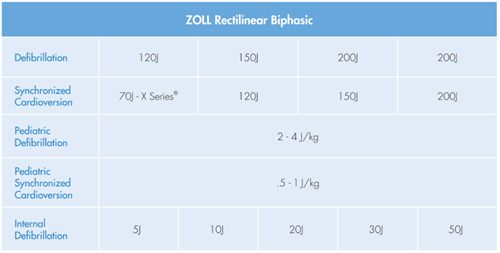
- The primary operational difference between Zoll and Stryker devices lies in energy delivery technology. This results in the operator selecting a lower energy level for defibrillation and cardioversion when using the Zoll.
- Standard energy escalation:
- LP15: 200 J → 300 J → 360 J
- Zoll Zenix: 120 J → 150 J → 200 J
- Current evidence suggests Zoll and Stryker products are equal in effectiveness for successful defibrillation and cardioversion.
- A laminated reference card outlining recommended energy settings has been affixed to the Zoll Zenix to reduce cognitive load during clinical use.
Rules of Engagement:
- The LP15 must remain operationally ready and accessible at all times throughout the duration of the trial.
- At a minimum, the LP15 must be immediately accessible within the vehicle as a backup device.
First few days using the Zoll Zenix:
- During the initial days of the trial and based on your comfort level, participants may elect to bring both monitors to calls where advanced cardiac procedures may be required, including cardioversion, defibrillation, or pacing. Once sufficient familiarity and comfort with the Zoll Zenix has been achieved, the LP15 can remain in the vehicle as a secondary (backup) device, to be used only if required.
What if your partner is not trained on the Zoll Zenix:
- When partnered with a paramedic who has not completed Zoll Zenix training, use of the device is at the discretion of the trained operator and should be guided by personal comfort and clinical judgment.
- Only the clinician operating the Zoll Zenix is required to have completed the training session.
- Use of the Zoll Zenix is not mandatory on every call. Participants may revert to LP15 at any time, for example:
- The operator is not comfortable using the Zoll Zenix
- A comparison between devices is desired
- Operational or cognitive workload… you just need a break.
Battery and charging options:
- The Zoll Zenix operates using a single battery, making proactive battery management essential. On a full charge, there should be about 5 hours of continuous running time. Battery runtime is mostly impacted by EtCO2 and NIBP cycling and to a lesser extend pacing and defibrillation.
- For power management, each unit for the trial will be equipped with:
- Two spare Zoll Zenix batteries
- One battery charger
- One Monitor Power Cable
- Suggested workflow for battery management:
- Keep the monitor plugged in between calls
- Keep the charger in the Ambulance / PRU and batteries charged
- Take a spare battery on intercepts or when traveling in another ambulance
- Take a spare battery and power cord on transfers
Cross compatible equipment between Zenix and LP15:
- BP Cuffs and pneumatic hose
- Spo2 probes (only from mid connection to the patient is compatible, the cable from monitor to mid connector is proprietary to Zoll)
- ECG electrodes
No cross compatibility between Zoll and LP15:
- Therapy cable and therapy pads
- ECG cable
- 12 lead cable
- Spo2 cable from monitor to mid connector (mentioned above)
- EtCO2 (nasal and ETT)
- Paper
12 Lead Transmission and uploading cardiac arrests:
- 12-leads Transmission to EPOS and PS: While you are in cell range this works as normal, but you will need to let EPOS or PS know you are using a Zoll monitor so they can find the ECG. When transmitting data an envelope will appear at the top of the screen with 2 arrows pointing left and right, this indicates attempting to send transmission. When the transmission is received successfully, a green check mark will appear over envelope (data transfer icon). The monitor will make 2 attempts at transmitting before a failure icon appears on the screen. If the data fails to transmit (poor cellular service) a red X will appear over the envelope.
- 12-lead Transmission to health care facilities for notification: No health authorities are set up to receive Zoll transmissions at the time of this trial. The only method is to contact who would normally be receiving the 12-lead transmission and ask for a number to text an image of the 12-lead to them.
- Cardiac Arrest Data: When you power down the monitor, you will be given 3 options:
- 1) Every case is uploaded to the Zoll Coud, including cardiac arrests. If you are out of cell range when this occurs, the monitor will attempt to send this data a second time but will stop attempts after the second time. If you turn on the monitor and discover there is message saying transmission failed, you will need to manually transmit the data when in cell range.
Self-test and Keeping the Pads attached: This is a change in workflow but must be done for the nightly self-check to pass. Every evening the Zoll Zenix (like the LP15) turns on and performs an automated self-test and a 30J defibrillation. To dissipate the energy safely the therapy cable must be attached. If the therapy cables are not attached when this test is performed, a red X will appear at the top of the monitor. This can easily be corrected by performing a self-test while connected to pads.
Notes
Resources
Helpful learning materials provided by Zoll:
Zoll Zenix Simulator: https://info.zoll.com/hubfs/Zoll.com/ZenixSim/index.html
Zoll Zenix Instructional Videos: https://www.zoll.com/en-us/education-and-resources/product-materials
Zoll Zenix Quick Reference Guide (also included in the monitor case): https://www.zoll.com/-/media/product-materials/product-manuals/zenix/06/9652-000995-06-sf_a.ashx?sc_lang=en-us
Zoll Zenix Comprehensive Operators Guide: https://www.zoll.com/-/media/product-materials/product-manuals/zenix/01/9650-000421-01-sf_b.ashx?sc_lang=en-us